Temperzone's New Unit Selection Program
Smarter HVAC selection, from individual units to complete projects
The new Temperzone Unit Selection Program (USP) makes it easier to find the right air conditioning solution for your project. Select from Temperzone and Hitachi systems using your required design conditions, with units assessed at variable capacities to more closely match the actual project duty. Adjustable tolerances and clearly displayed comparisons help you quickly understand how each option performs against your critical requirements.
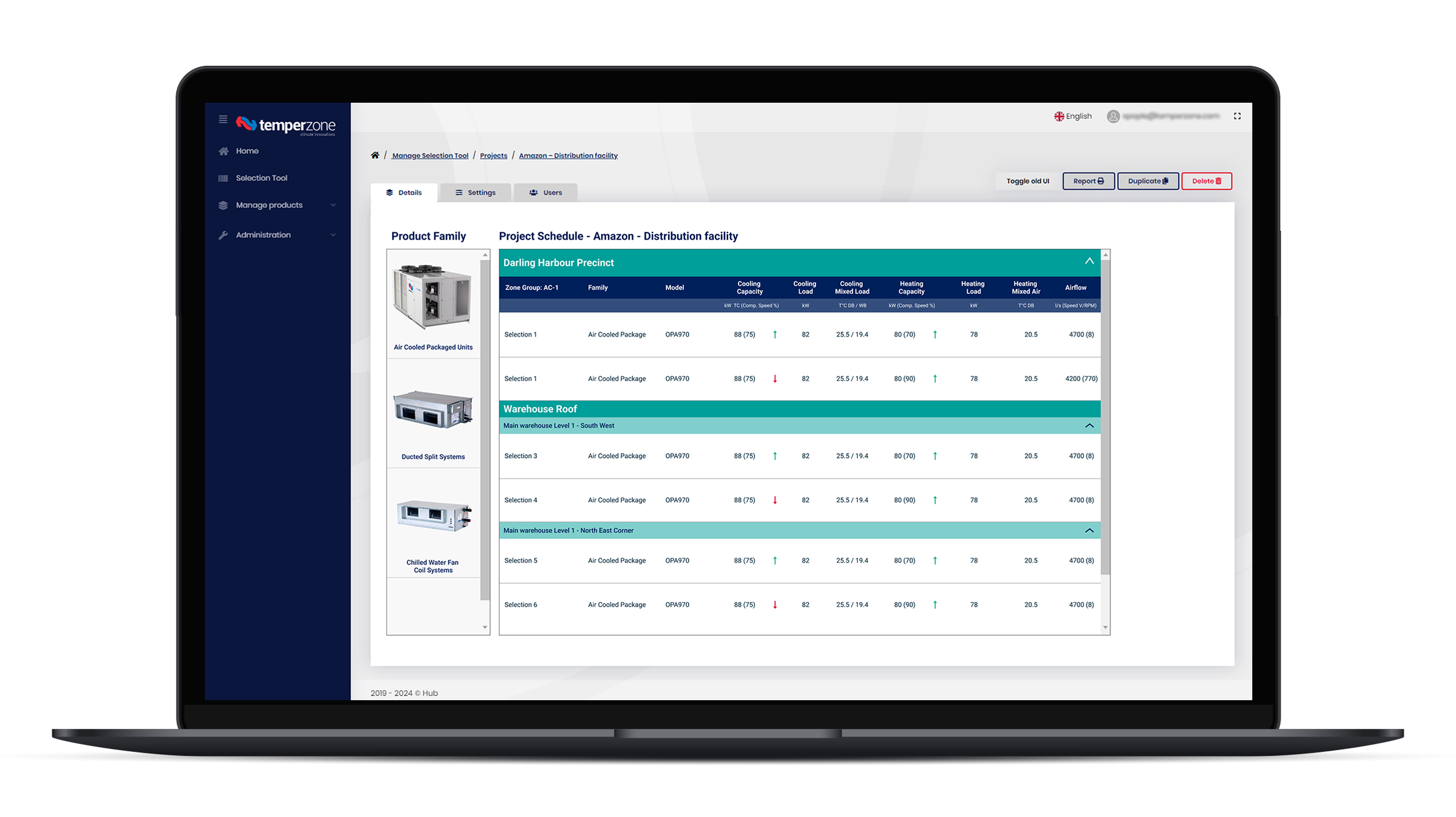
Designed for projects of all sizes, the program allows you to organise selections by project, building, floor and zone, while quick search, duplication and editing tools make it easy to build and update equipment schedules. Detailed selection information includes simulated duties, fan curves, sound data and an indicative EER at the selected operating conditions.
When your selections are complete, generate standardised PDF reports or configurable Excel schedules containing the information you need. With multiple projects, integrated help documentation and both Temperzone and Hitachi products available in one intuitive platform, the DX Selection Program provides a faster, more consistent way to take your project from initial selection through to documented solution.
From project requirements to documented selection, made simpler.
Key Summary
- Faster HVAC system selections
- More accurate performance-based results
- Select Temperzone and Hitachi products in one platform
- Designed for complex multi-zone projects
- Advanced engineering tools including fan curves and part-load performance
- Professional reports and schedules generated instantly
Key Features and Benefits
Project Management & Productivity
Multiple projects in one platform
Manage multiple jobs simultaneously without creating separate databases or files.
Building, floor and zone organisation
Create project hierarchies using Groups, Subgroups and Zones. Simplifying large and complex projects by structuring selections to mirror real building layouts.
Duplicate zones and selections
Quickly duplicate existing selections and modify them. Speeding up repetitive design work and reducing data entry.
Quick Search and Quick Select
Search for known model numbers and automatically populate nominal selection data. Reducing selection time and providing a quick and easy starting point for design development.
More Accurate Selection Capability
Variable capacity selection
Units are selected and assessed at the operating capacity required by the project rather than solely at nominal conditions. Providing a more realistic representation of unit performance under actual design conditions.
Part-load performance mapping
View performance at different loading points. Helping to identify more efficient solutions and understand how unit sizing impacts operation.
Adjustable tolerance settings
Tolerance can be applied to critical selection criteria. Giving designers greater control and flexibility when comparing potential solutions.
Critical criteria prioritisation
Select which performance requirements are most important. Focusing results on the parameters that matter most to the project.
Selection comparison indicators
Clearly shows whether results are higher, lower or equal to required values. Making it easier to compare alternatives and identify suitable units quickly.
Closest-match recommendations
Software suggests the nearest matching products. Reducing time spent manually searching through product ranges.
Expanded Design Flexibility
Wide operating temperature ranges
- Cooling selections up to 50°C ambient
- Heating selections down to -10°C ambient
Supports projects operating in challenging environmental conditions.
Wide water temperature capability
- Water temperatures up to 50°C
- Water temperatures down to 5°C
- Wide water ΔT ranges
Providing greater flexibility for water-cooled system applications.
Adjustable conditions
All air and water conditions are pre-populated with MEPS T1 and H1 conditions that can be easily modified to suit your specific conditions. Mixed air conditions are automatically calculated using airflow volumes.
Air off temperature calculations
Supply air conditions for both cooling and heating are reported and can be quickly referenced.
Advanced Performance Information
Fan curve plotting
Displays fan curves with the actual operating point highlighted. Simplifying airflow validation, assisting with external static pressure assessments and showing how close to any limits the unit is.
Suggested fan control voltages
Helps optimise fan performance and provide a starting point for commissioning settings.
Sound data reporting
Sound data is available in this report, matching technical data. No need to go to another place to gather information
Load and simulated performance data
Shows requested load conditions and simulated output. Reducing double-checking and improving confidence that selected units meet project requirements.
Indicative operating EER/COP information
Performance data provided at the selected operating point rather than only standard rating conditions. Supporting energy assessments and comparison of alternative solutions.
Integrated Product Selection
Temperzone and Hitachi products in one platform
Select from both brands within the same project. Eliminating the need to switch between separate selection tools and enables easier project comparison.
Reporting & Documentation
Professional PDF reports
Generate standardised selection reports. Providing consistent, client-ready documentation.
Flexible Excel exports
Choose which fields are included in exported schedules. Simplifying equipment scheduling and project documentation workflows. Allowing copy-and-paste or referencing of information into other databases.
Detailed project schedules
Selection reports include structured project and zoning information. Making it easier to coordinate and document large projects.
Ease of Use
Built-in help documentation
Integrated, navigable user guidance. Enables users to quickly learn features and resolve questions independently.
Clicking on the  button, redirects you to an in-depth complete walk-through tutorial.
Easy project editing
Rename, modify, duplicate and delete selections directly from the project view. Streamlining revisions throughout the design process.
Click here to access Unit Selection Program (USP).